
Introduction
You have probably had this experience: with the same prompt, today's image is so stunning you want to screenshot and save it; click again tomorrow and the fingers come out as six. Text behaves the same way — one version reads smoothly and naturally, then you regenerate it and it starts talking nonsense.
We call this phenomenon gacha-style trial and error. Generative AI is essentially a gacha machine: you feed in a prompt, and it hands back a result that is partly down to luck. When you get a usable result, everyone is happy; when you do not... roll again.
The previous two pieces covered the concepts and tools of multimodal generation. This one takes on a more practical question: now that the tools are in hand, how do you get AI to reliably produce image-and-text results you are satisfied with?
The answer is not “find one magic prompt that nails it in a single shot” — that is a fantasy. The answer is to acknowledge that gacha draws exist, and then to play the gacha game more cleverly.
1. Once you see generation as a gacha draw, the problem becomes clear
Once you accept that “generation = a gacha draw”, your vague anxiety turns into three problems you can actually work on:
- How to make each draw more likely to get a usable result?
- How to tell whether this particular draw got a usable result?
- What to do when it did not?
These three questions map to three things: state your requirements clearly (structured prompts), define what counts as passing (Eval), and fix what fails (iteration). Linked together, they form a feedback loop:
Structured prompt → generation (a gacha draw) → Eval verdict → keep if it passes / repair and retry if it does not → ...
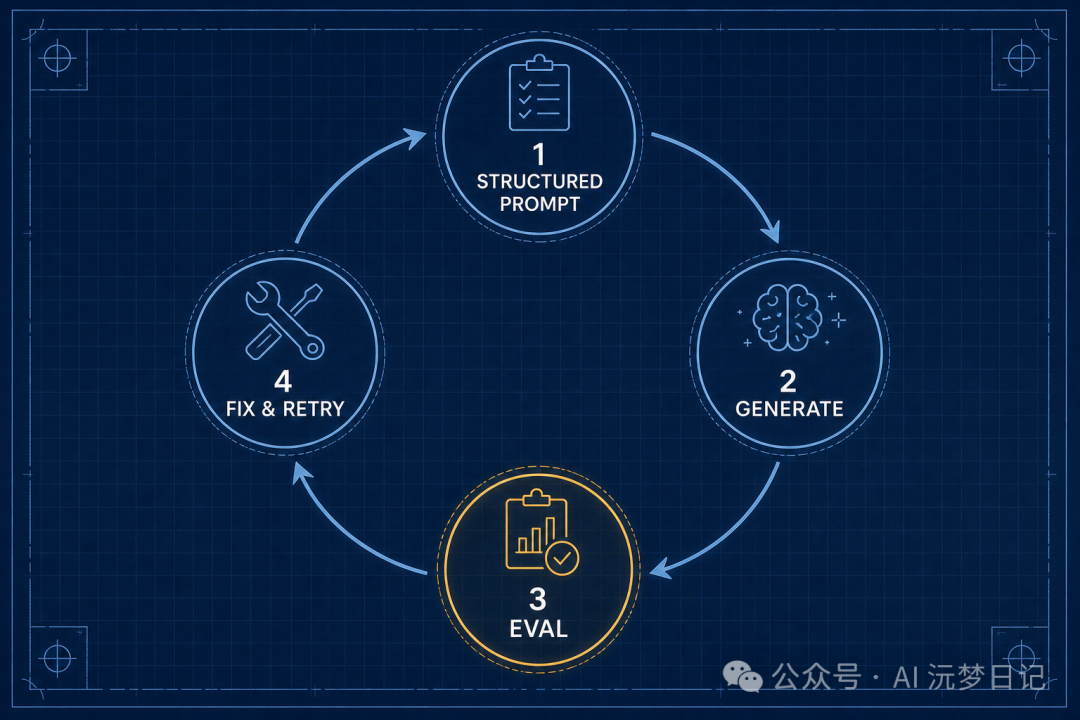
In fact, most people run this loop every day: write a prompt, look at the result, revise and redraw if unsatisfied. They just run it by feel. What this piece is about is how to upgrade that by-feel loop into a workflow that has standards, is reproducible, and is not exhausting.
Let us break them down one by one.
2. Raise the success rate: turn “what I want” into a structure
Why does “draw a cat” have a low success rate? Because you have handed nine tenths of the decisions to luck. The model has to guess for you: which breed, what pose, what background, what art style, whether to include text... It improvises randomly on every one of them, so the odds of assembling exactly the image in your head are naturally low.
A structured prompt is essentially about writing out explicitly the requirements you keep by default in your head, leaving less room for luck. A plain but useful structure:
- Subject: orange tabby, kitten, round face
- Scene/action: dozing on the windowsill, rain outside the window
- Style: flat illustration, warm tones
- Constraints: no text in the image
- Output: landscape, blank space on the left for a title
How fine-grained can a prompt get? Last year, when model capabilities were not as strong as they are now, I was making a picture book and, to keep the same character consistent from page to page, I made the prompt extremely fine-grained — so fine that I spelled out even the length of the sleeves. Models are much smarter now, and this level of detail may no longer be necessary, but the principle has not changed: the more stability you want, the more you have to move the things that “default to your head”, one by one, into the prompt.
Of course, the structure above is only the plainest kind of demonstration and is nothing to boast about — genuinely refined prompts involve a great deal more craft: negative prompts, weight control, reference images, style anchoring... And every image-generation tool has its own temperament. But do not get tangled up in the specific syntax; what this section wants you to take away is not those fields, but the core: take the requirements that default to your head, break them apart, and write them out explicitly, one by one. Get the structure right first, then talk about refinement.

Both are gacha draws, but a vague prompt is like gambling hard on an SSR within a ten-pull; a structured prompt is like maxing out the pity guarantee first, and then pulling. The success rate will never reach 100%, but it climbs visibly.
In one line: a structured prompt does not guarantee a usable result, but it sets the floor of your success rate.
3. Tell whether it produced a usable result: break “satisfied” into dimensions you can score (this is Eval)
With the success rate raised, the next question arrives: what counts as a usable result?
“I think it is fine” is not enough. Judging by feel has three defects: today's standard and tomorrow's drift apart, it cannot be delegated to someone else, and it certainly cannot be handed to a machine. To be stable, to scale, you first have to break the subjective matter of “satisfied” down into several objective dimensions you can check one by one.
This is Eval (quality evaluation of content). But first, clear up a misunderstanding: Eval has no one-size-fits-all universal checklist. What you evaluate is worked backwards from your goal.
There is a general skeleton that most generation comes down to:
- Text: is it off-topic, is it solemnly talking nonsense (factual errors / hallucinations), is the tone and style right, is it wordy or repetitive.
- Image: does the image match the text, has the picture fallen apart (malformed hands, extra limbs), is the content appropriate.
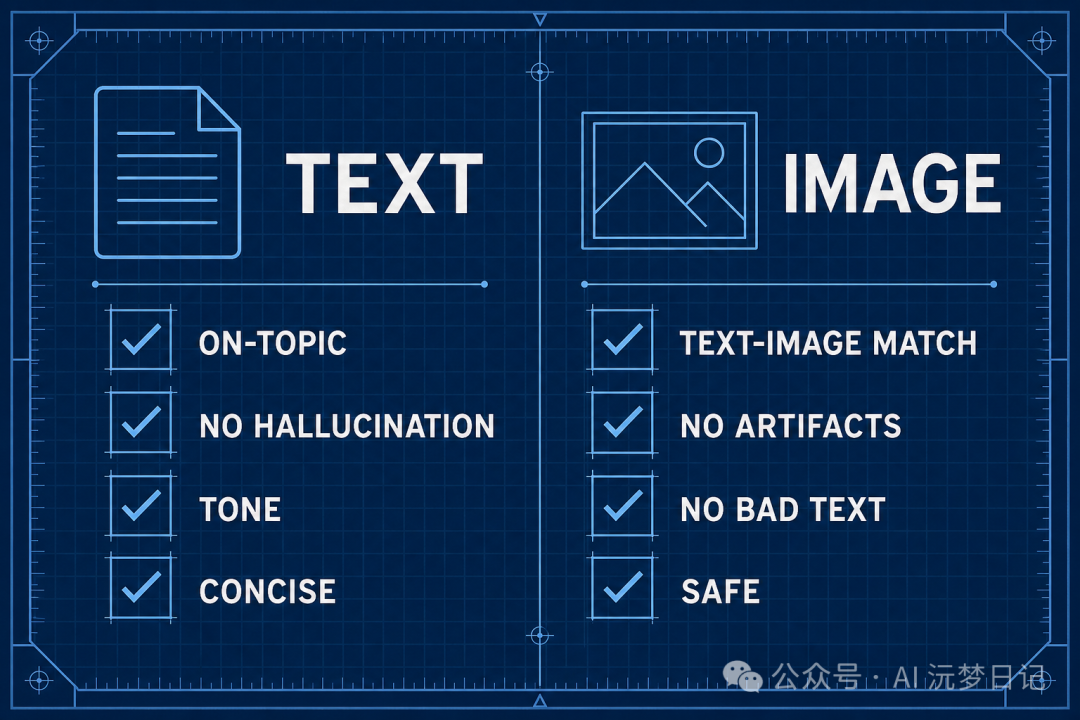
But what really decides success or failure is often the few dimensions specific to your scenario. For example: when I make Chinese learning cards, I add one iron rule — beyond the learner's level: a sentence must not contain characters or words the student has not yet learned. This rule is meaningless for writing novels or ad copy, but for teaching it is a lifeline. So do not memorise someone else's checklist; ask yourself “in my scenario, what counts as failing”, write the answers down one by one, and that is your Eval.
Going further, most of these dimensions can be scored for you by AI — hand a multimodal model an image and a sentence, and ask it “do these two match, on a scale of 1 to 5”. But there is an easily overlooked pitfall here: the judge itself also draws from the gacha. For the same image it gives a 5 one moment and a 3 the next, and the evaluation becomes a second source of randomness. A few common-sense moves to steady the judge: set randomness to its minimum, force it to give its verdict in a fixed format, and retry automatically on error.
4. What to do when a draw fails? “Rolling again” is the lightest fix
When a draw fails, most people's first reaction is to pull again. That is not wrong — rolling again is the least troublesome move — but it is also the lightest move: if the problem lies in the prompt itself, you can draw a hundred times and the broken part will still be broken.
In reality there is more than one kind of fix besides “rolling again”; the key is matching the remedy to the cause — and which remedy to prescribe is exactly what Eval tells you about “where the problem is”:
Three approaches · match the remedy to the cause
- Roll again unchanged: the image as a whole is fine, this draw simply had bad luck — change the seed and pull again.
- Edit this prompt and pull again: Eval points out that the image and text do not match, or that a count was drawn wrong — add a targeted constraint and pull again. The most used and most effective option.
- Inpaint a local region: nine tenths of the image is good and only the face or the hand is broken — select just that patch to redraw, keeping the rest; far better value than starting the whole thing over.
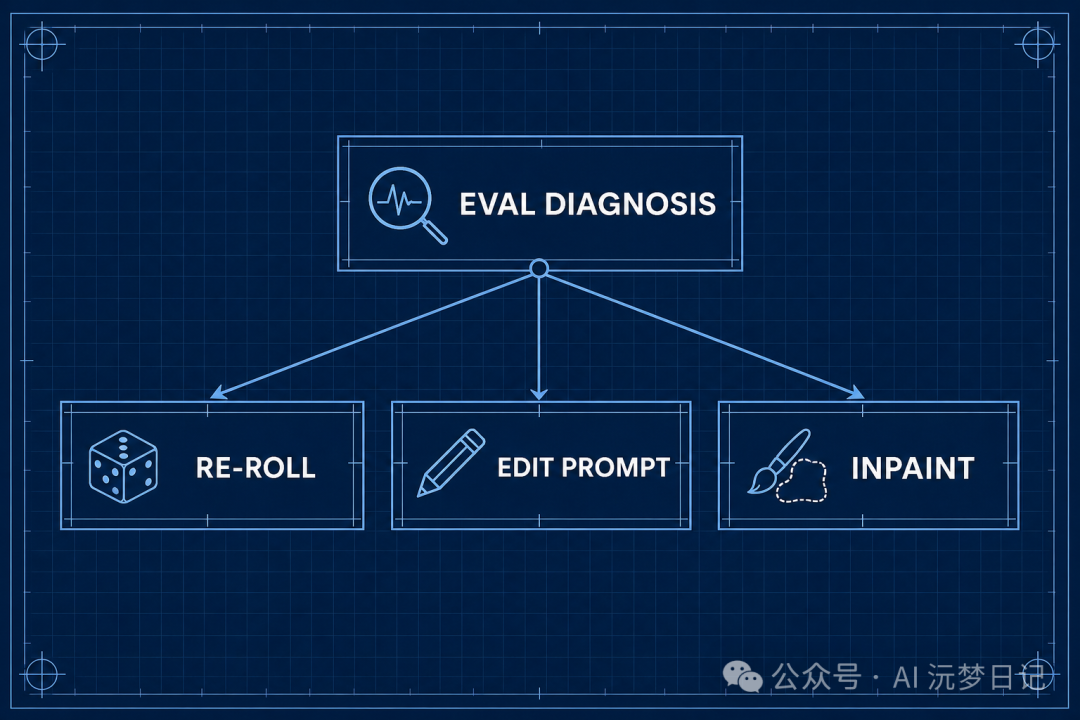
You see, Eval's value goes far beyond the on/off switch of “pass / fail”. An evaluation that only spits out pass/fail is of little use; only an evaluation that can tell you “is it a text-image mismatch, or a broken hand” can drive you to pick the right fix. Diagnose first, then prescribe — far more efficient than pulling again blindly.
Chain these moves together and you have the complete image-and-text feedback loop: structured prompt draws → Eval diagnosis → pick roll again / edit the prompt / inpaint according to the problem → evaluate once more. It turns generation from “praying for a one-shot success” into a process that allows failure — and makes failure cheap and controllable.
The key to keeping the loop from being exhausting: a human is in the loop, but the human only looks at the grey zone. What clearly passes and what is plainly a write-off is filtered out by Eval; the human only adjudicates the “maybe yes, maybe no” cases.
So what about the next step? The “edit this prompt” above is done by hand, for a single image. The ideal is to systematise it: let Eval automatically distil common problems from hundreds or thousands of results, feed them back to improve the template prompt, and let the overall success rate snowball. Honestly, this step is hard, and I am still doing it by hand — but even if you only reach the “diagnosis + targeted repair” layer, you are already a long way ahead of “drawing by feel”.
5. Once the standard is fixed, scaling follows naturally
By now you will notice something interesting: once “what counts as passing” has been broken into crystal-clear dimensions, volume is no longer a problem.
Because draws can be pulled in batches, Eval can score in batches, and the non-conforming can be redone in batches — the human only takes one final look at the list of “what passed, what needs rework”. That is how I got through the images and text for several hundred Chinese learning cards: not by working fast, but because once the standard is fixed, repetitive labour can be handed off.
But remember, scaling is only a result, not a threshold. This “draw—diagnose—repair” approach is immediately usable even if you only make 5 images. It has nothing to do with volume, and everything to do with whether you are willing to think “satisfied” through clearly.
In closing
Back to the opening question: how do you get AI to reliably produce image-and-text results you are satisfied with?
- Accept that it is a gacha draw; do not gamble on a one-shot success;
- Use structured prompts to raise the success rate of each draw;
- Use Eval to break “satisfied” into judgeable dimensions;
- Wire it into a feedback loop, repair the actual cause, and keep the human on the grey zone only.
From concepts and tools to the practice in this piece, what truly separates people in multimodal generation is never whose prompt is more arcane or whose tool is newer, but who treats “quality” first as something that can be defined, measured, and iterated on.
Drawing a good card depends on luck; getting a usable result reliably depends on a workflow.